Upgrading or downgrading your plan
Overview
If you need more features just want to change your plan, you can upgrade or downgrade your plan any time from the Billing page in your account settings.
How to change your plan
-
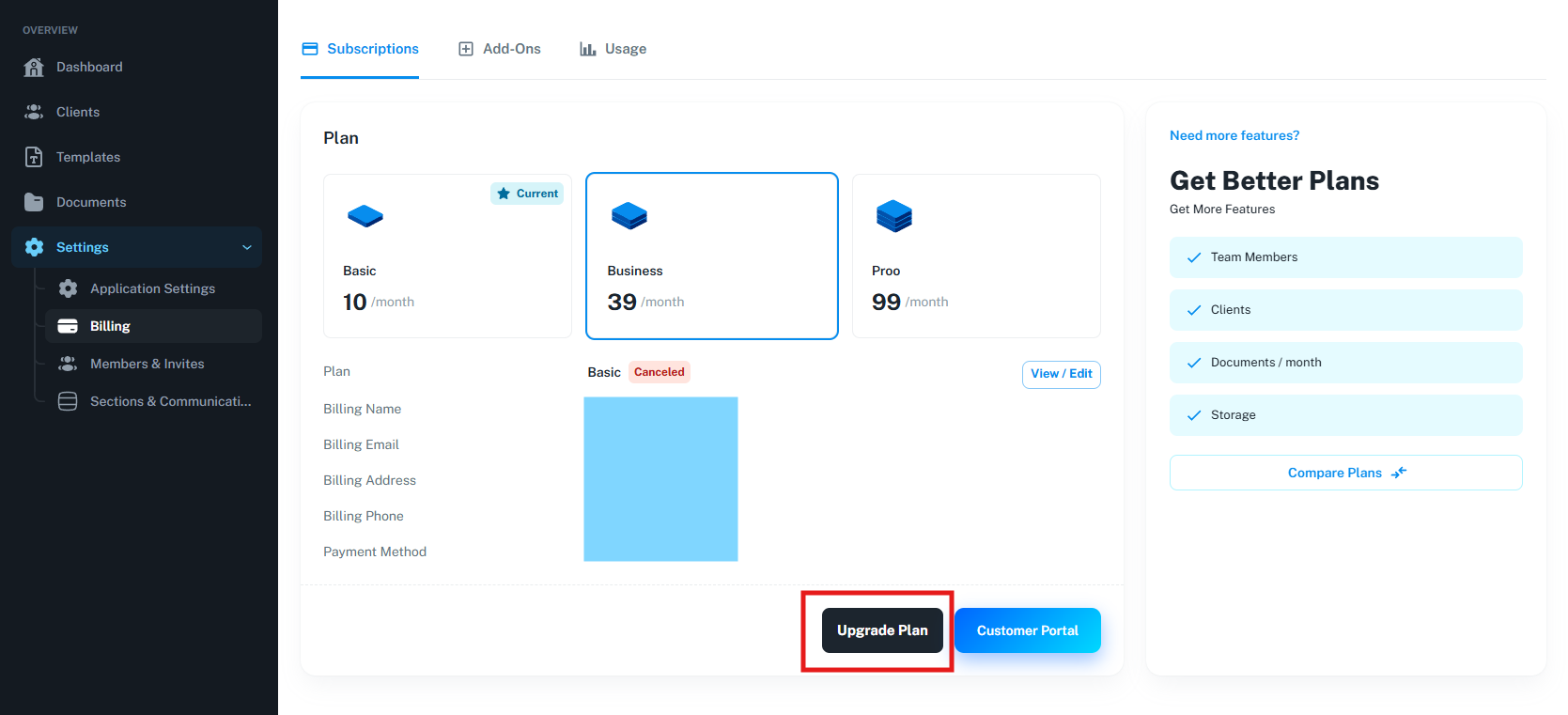
Open the app and go to
Settings→Billing. -
Select a new plan than click on
Upgrade Plan. -
If you don't have an active plan you will be redirected to checkout
-
If you have an active plan, a estimation dialog will apear and if you confirm it, a payment will trigger.
-
If the payment fail / needs 3D secure authentication, you have to enter in "Customer Portal" (The button near "Upgrade Plan" button)
-
In Customer Portal select the invoce cu status "open" / "failed" / "require action" and than continue the payment flux
Billing & proration
-
Upgrades take effect immediately; you'll be charged a prorated amount for the remainder of your billing period.
-
Downgrades also take effect immediately. If you have remaining time, you will be charged less next cycle.
Need help?
Contact support via chat or email if you need a custom plan or if you want to change billing dates.
Chat support is available in billing page