Custom SMTP setup
Overview
You can send PresentDoc emails through your own SMTP server for better deliverability and branding (branding is only for clients with Pro plan).
Requirements
You’ll need:
-
SMTP host and port
-
Username and password (or API key)
-
Encryption type (TLS/SSL)
-
From address and sender name
Setup steps
-
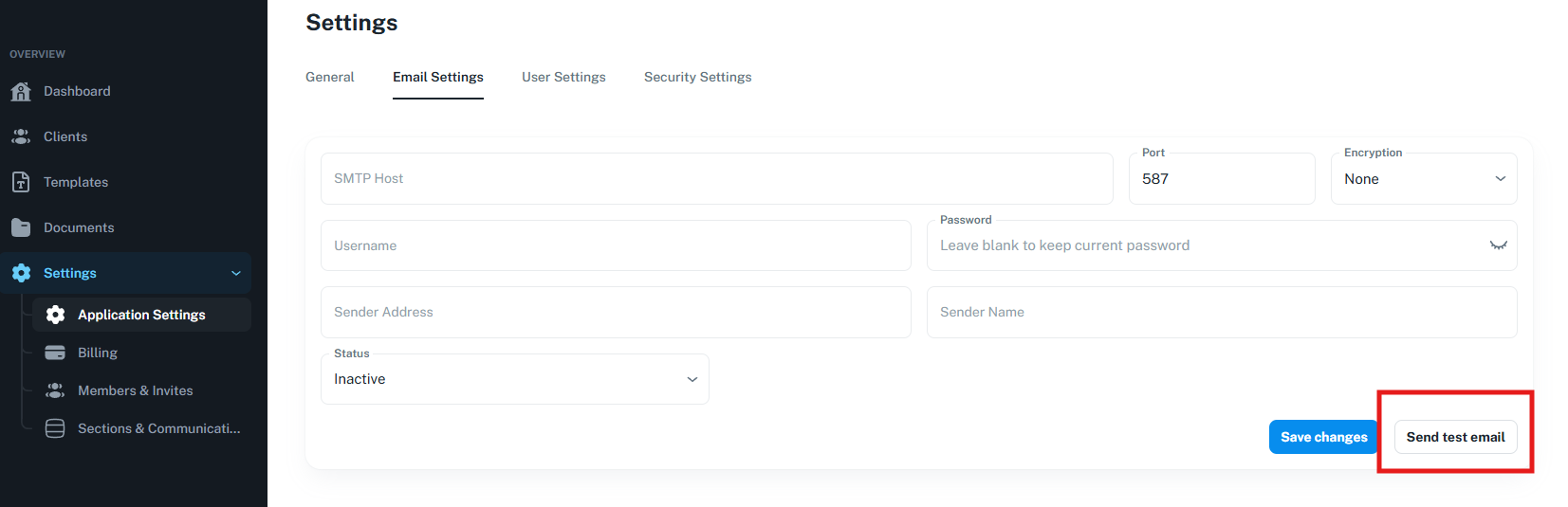
Go to Settings → Application Settings → Email Settings.
-
Enter your SMTP credentials.
-
Choose encryption (TLS/SSL) and port.
-
IMPORTANT - Set the status to active otherwise the changes will not apply
-
Save and send a test email.
Troubleshooting
-
Authentication failed: verify username/password or API key.
-
Connection timeout: check host, port, and firewall rules.
-
Emails go to spam: configure SPF, DKIM, and DMARC.
Notes
If SMTP is misconfigured, the system may fall back to default mail settings or block sending until corrected.